In this exercise, we use data from the Family Resources Survey (FRS), 2022-2023 financial year to get familiar with the hierarchical and flat file datasets using SPSS.
Getting started
1. The dataset
The dataset we will be using in this exercise is the Family Resources Survey, 2022-2023. These data are safeguarded. You can download them from the UK Data Service after registration.
To get the Family Resources Survey (FRS), 2022-2023 dataset, go to the data catalogue page, login to your account (create an account if you do not already have one), download and save the SPSS version, which we will use in this exercise.
Create a new folder to save the downloaded data and analysis work in appropriate location on your machine and give that folder a name.
The exercise below assumes that the dataset has been saved in a new folder named UKDS on your Desktop (Windows computers). The path would typically be C:\\Users\\YOUR_USER_NAME\\Desktop\\UKDS. You can change it to the location that best suits you.
Remember to adjust the code below to match the location of the data on your machine.
The FRS is a hierarchical dataset provided every year in multiple data files (known as ‘tables’ in the FRS language). The number of these tables varies, depending on the year of the survey. The 2022-2023 FRS has 25 tables. In this exercise, we will use the two general-purpose tables “adult.sav” and “benunit.sav” as well as the specialised table “pension.sav” and the FRS flat file “frs2223.sav” to:
- Make a subset of the datasets.
- Explore the variables in each dataset by conducting descriptive analysis (frequency tables, summary statistics and cross tabulation).
2. Setting up SPSS
Setting up and showing the working directory
First, define the location of the working directory at the beginning of your SPSS syntax file. You can do this using thecd command, which stands for “change directory”.
You can check the working directory using the show DIRECTORY command.
cd 'C:\Users\YOUR_USER_NAME\Desktop\UKDS'.
show DIRECTORY.Note: change the command above to match your working directory.
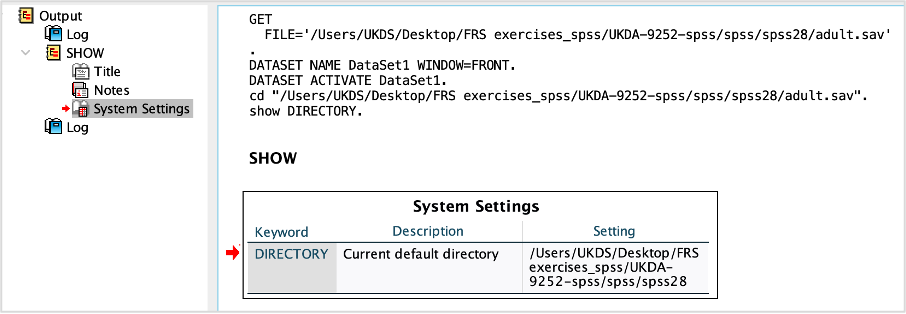
Opening the four FRS tables
We start by opening the four datasets adult.sav, benunit.sav, pension.sav and frs2223.sav that we will be using in this exercise. If you have your working directory saved to the folder location, the following code should open these datasets:
GET FILE='UKDA-9252-spss/spss/spss28/adult.sav'.
GET FILE='UKDA-9252-spss/spss/spss28/benunit.sav'.
GET FILE='UKDA-9252-spss/spss/spss28/pension.sav'.
GET FILE='UKDA-9252-spss/spss/spss28/frs2223.sav'.
3. Preparing the datasets
After opening the FRS tables, we begin with exploring the adult.sav, benunit.sav, pension.sav and frs2223.sav datasets.
But first, we will have a quick look at the number of observations (cases) and the number of the variables in these tables. You can do this by either inspect variables and cases in the Data view or use the codes below to produce a summary of all the variables in each dataset. We will start with the adult.sav dataset as follows:
GET FILE='UKDA-9252-spss/spss/spss28/adult.sav'.
  CODEBOOK all.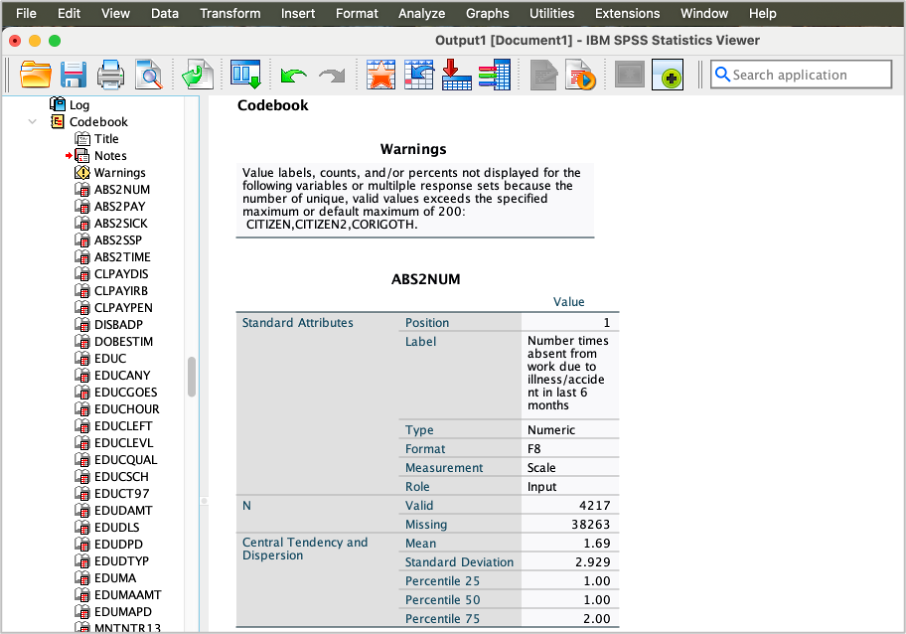
You can repeat the same steps to get a summary of all the variables in benunit.sav, pension.sav and frs2223.sav datasets as follows:
GET FILE='UKDA-9252-spss/spss/spss28/benunit.sav'.
  CODEBOOK all.

GET FILE='UKDA-9252-spss/spss/spss28/pension.sav'.
  CODEBOOK all.

GET FILE='UKDA-9252-spss/spss/spss28/frs2223.sav'.
  CODEBOOK all.
You will notice that the frs2223.sav table has the largest number of variables (7,070 variables). The adult.sav table has 587 variables, the benunit.sav table has 276 variables, and the pension.sav table has 50 variables.
- Why is the number of the variables in the pension.sav table the smallest?
- Which table has the smallest number of observations?
- Which tables have the same numbers of observations? Why?
- These tables have different units of analysis. The adult table include data at the individual level, the benunit and the frs2223 tables have data at the benefit unit (family) level. The pension table is a specialised data that can be analysed at person, benefit unit and household level, which is a subset data representing participants who are receiving income from a pension (see the FRS documentation for the definition of each level).
- The pension table has the smallest number of observations (15233 observations).
- The frs2223 and benunit have the same numbers of observations (28629). Because both tables include data at benefit unit level.
4. The variables
We will only be using a few variables from each table in this exercise. So, we will create subsets data from these four tables, containing the variables we will use in this exercise. The tables below shows the variables (names and labels) that we will select from each FRS table.
| Variable name | Variable label |
|---|---|
| Variables from the adult table | |
| SERNUM | Sernum |
| BENUNIT | Benefit Unit |
| PERSON | Person |
| HEALTH1 | Whether has a long standing illness |
| SEX | Sex |
| IAGEGR4 | Individual Adult 5 Year Age Bands - Anon |
| GROSS4 | Grossing variable |
| Variables from the benunit table | |
| SERNUM | Sernum |
| BENUNIT | Benefit Unit |
| famtypbu | Family Type |
| Variables from the pension table | |
| SERNUM | Sernum |
| BENUNIT | Benefit Unit |
| PERSON | Person |
| PENPAY | Amount of last payment from pension (continuous variable) |
| PENTYPE | Pension Type |
| Variables from the frs2223 table | |
| SERNUM | Sernum |
| BENUNIT | Benefit Unit |
| PERSON | Person |
| HEALTHHD | Whether has a long standing illness |
| SEX | Sex |
| FAMTYPBU | Family Type |
#Create subset datasets from the original data files
#Use match files and Keep commands
#The code below just keeps the variables we are interested in. We will name the new datasets as frs_adult2223_short, frs_benunit2223_short, frs_pension2223, and frs_frs2223_short, respectively.

GET FILE='UKDA-9252-spss/spss/spss28/adult.sav'.
match files FILE = */keep SERNUM, BENUNIT, PERSON, GROSS4, HEALTH1, SEX, IAGEGR4
Save OUTFILE='frs_adult2223_short.sav'
/COMPRESSED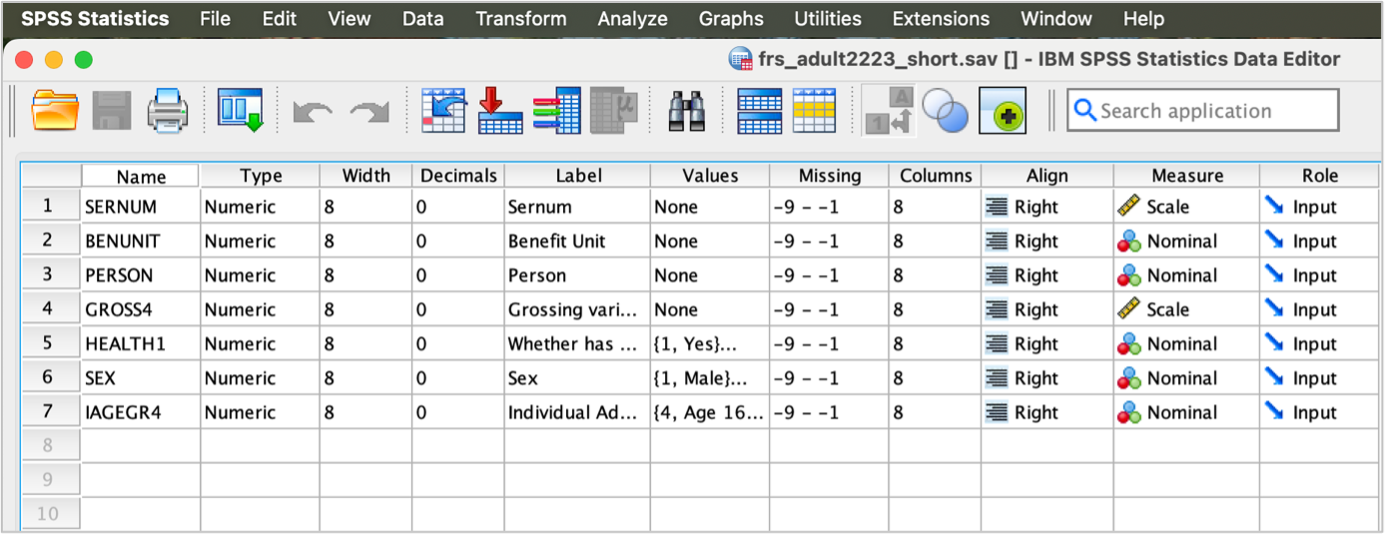
GET FILE='UKDA-9252-spss/spss/spss28/benunit.sav'.
match files FILE = */keep SERNUM, BENUNIT, famtypbu
Save OUTFILE='frs_benunit2223_short.sav'
    /COMPRESSED

GET FILE='UKDA-9252-spss/spss/spss28/pension.sav'.
match files FILE = */keep SERNUM, BENUNIT, PERSON, PENPAY, PENTYPE
Save OUTFILE='frs_pension2223_short.sav'
    /COMPRESSED

GET FILE='UKDA-9252-spss/spss/spss28/frs2223.sav'.
match files FILE = */keep SERNUM, BENUNIT, PERSONHD, HEALTHHD, SEXHD, FAMTYPBU
    Save OUTFILE='frs_frs2223_short.sav'
    /COMPRESSED
The hierarchical tables
Explore the datasets
Let’s start by having a quick look at the three newly generated datasets frs_adult2223_short, frs_benunit222_short and frs_pension2223_short.
We will start with the frs_adult2223_short dataset. Either inspect variables and cases in the Data View or use the code below to display a dictionary of all the variables in the dataset.
GET FILE='UKDA-9252-spss/spss/frs_adult2223_short.sav'.
    DISPLAY DICTIONARY.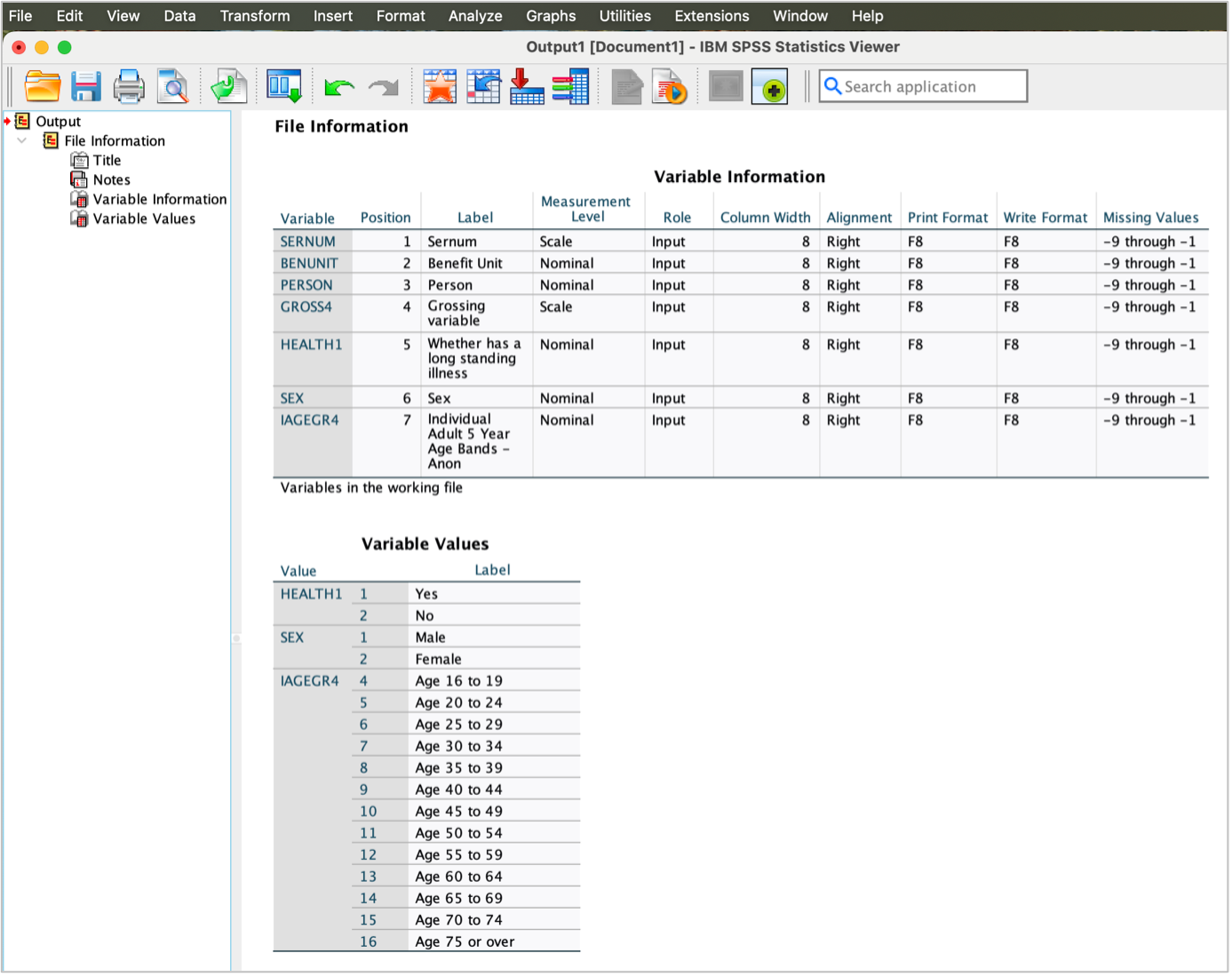
Now, let’s have a quick look at the frs_benunit2223_short dataset.
GET FILE='UKDA-9252-spss/spss/frs_benunit2223_short.sav'.
    DISPLAY DICTIONARY.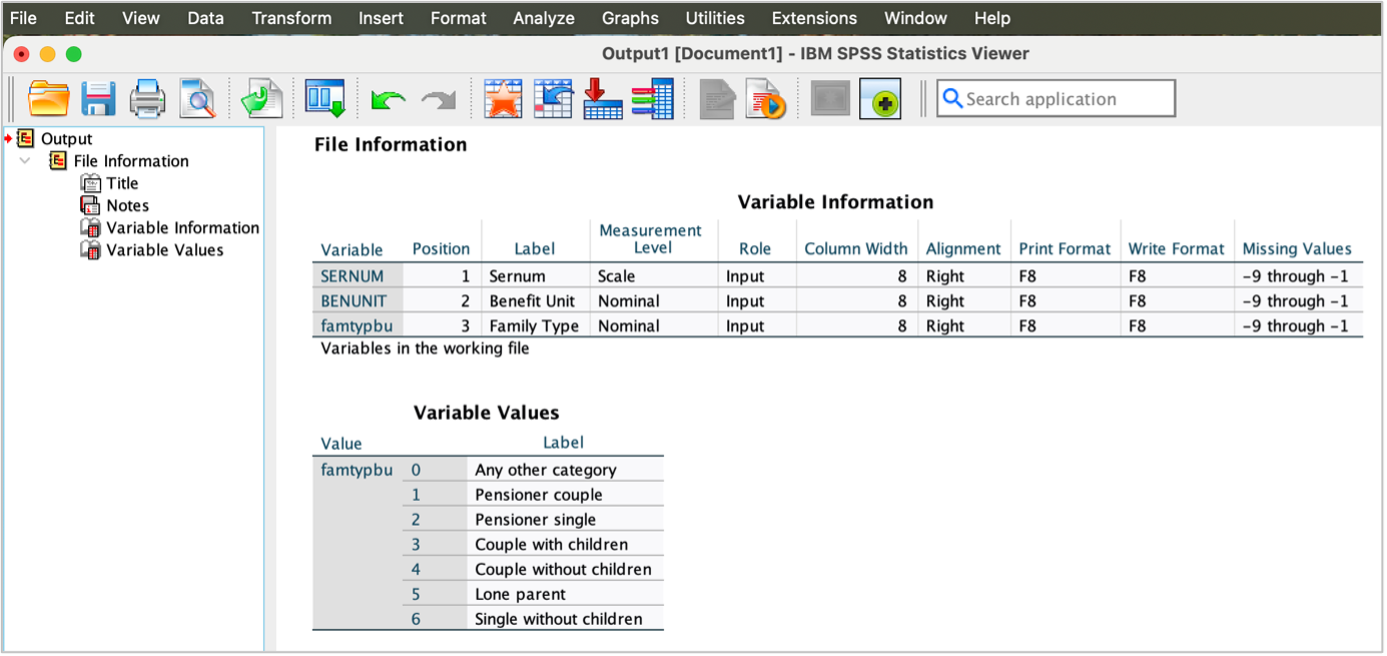
You can have a comprehensive information about the data using the codebook command. So, let’s explore frs_adult2223_short and frs_benunit2223_short datasets.
GET FILE='UKDA-9252-spss/spss/frs_adult2223_short.sav'.
    CODEBOOK all.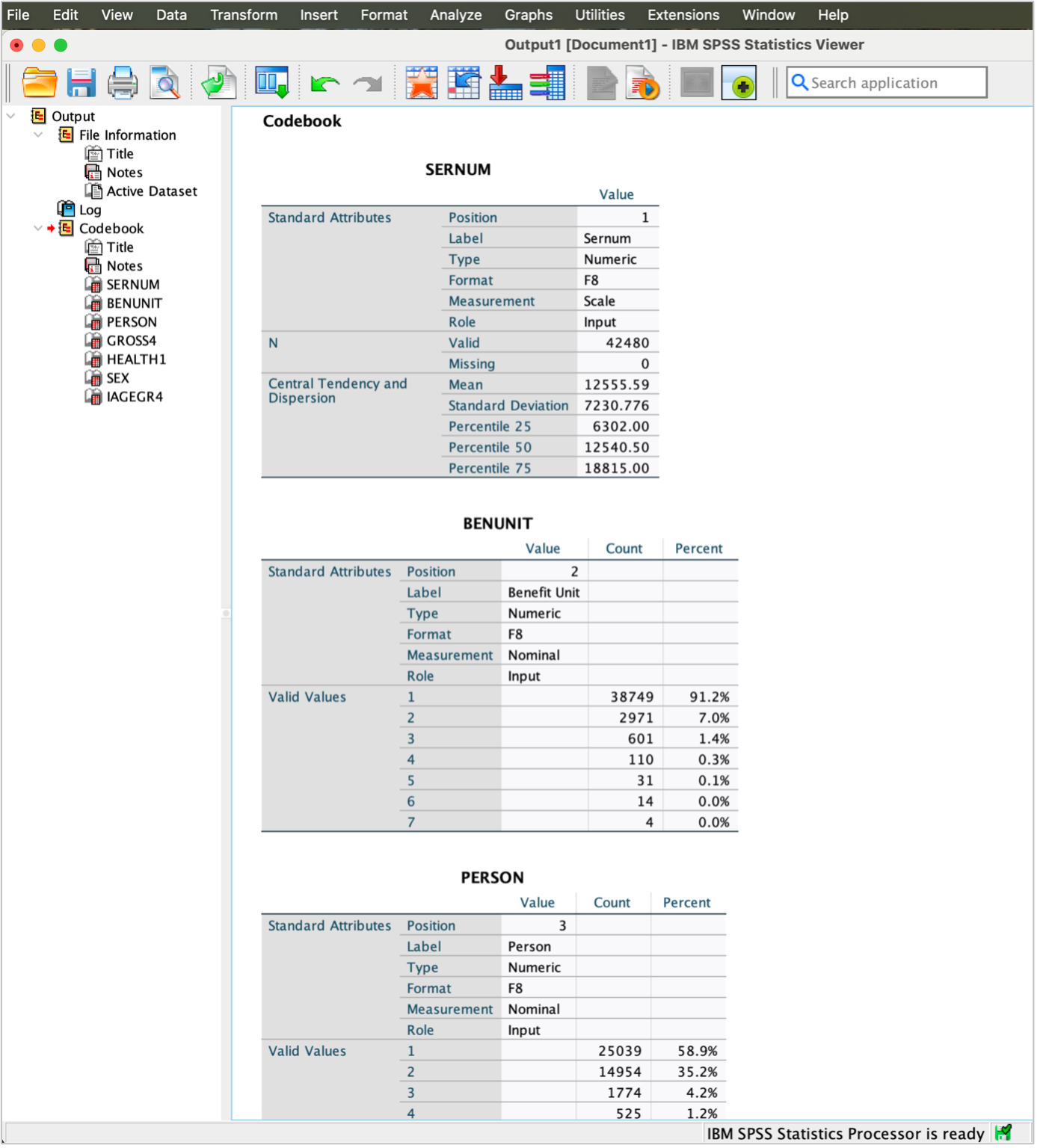
GET FILE='UKDA-9252-spss/spss/frs_benunit2223_short.sav'.
    CODEBOOK all.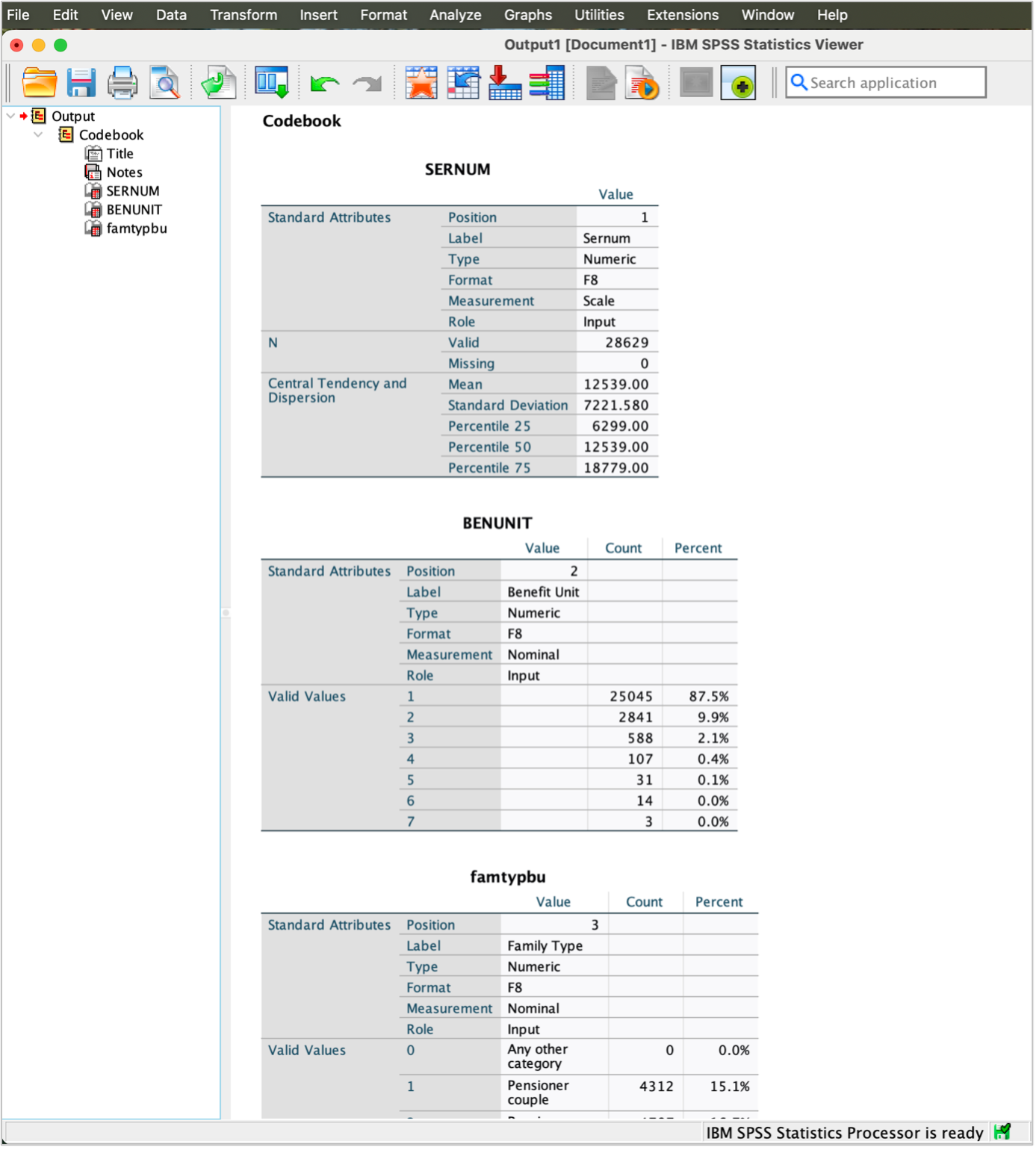
Your turn!
Use the frs_pension2223_short dataset to get an idea about the variables.
- What is the overall sample size of the frs_pension2223_short dataset? Use
CODEBOOKcommand. - List the names and labels of the variables in frs_pension2223_short dataset. Use
DISPLAYDICTIONARY command.
Outcome!
- The overall sample size of the frs_pension2223_short dataset is 15233.
GET FILE='UKDA-9252-spss/spss/frs_pension2223_short.sav'.
  CODEBOOK all.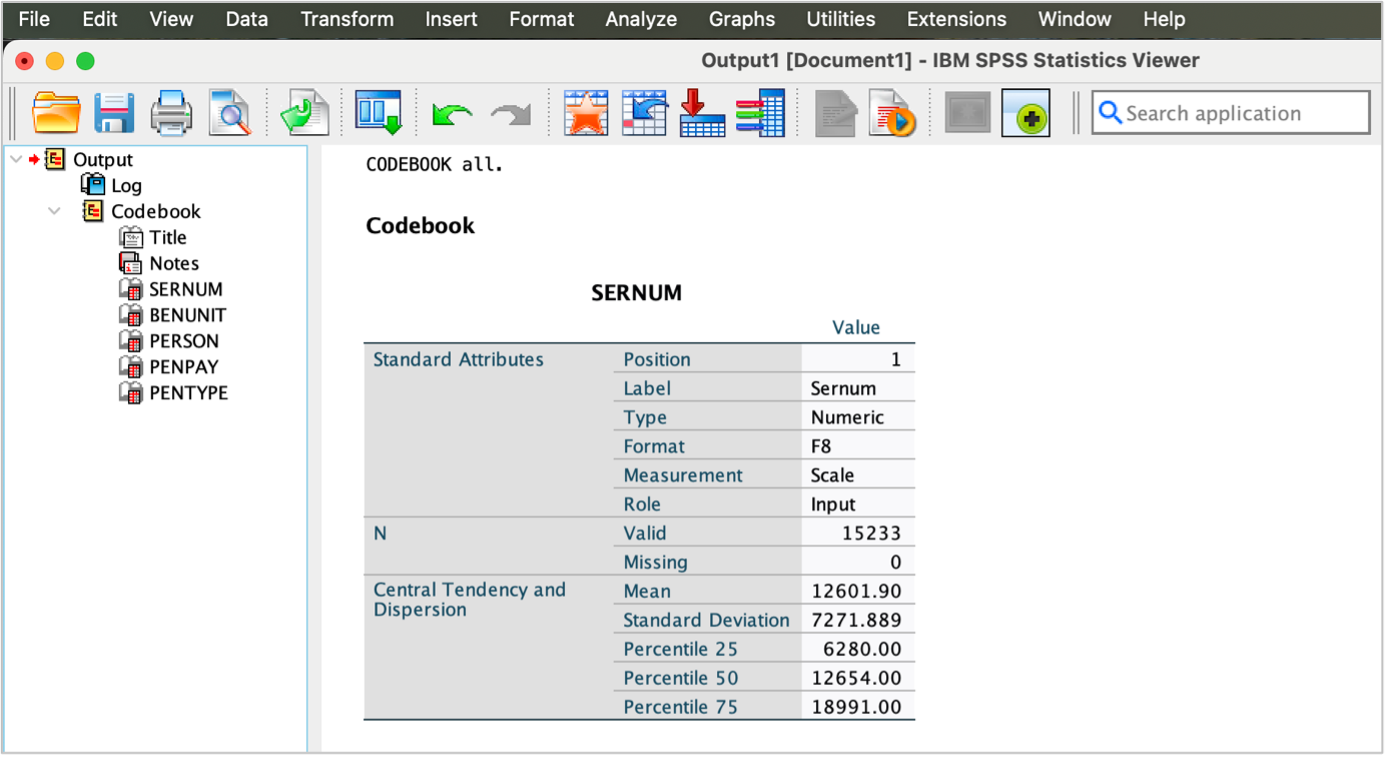
- Names and labels of the variables in frs_pension2223_short dataset:
GET FILE='UKDA-9252-spss/spss/frs_pension2223_short.sav'.
  DISPLAY DICTIONARY.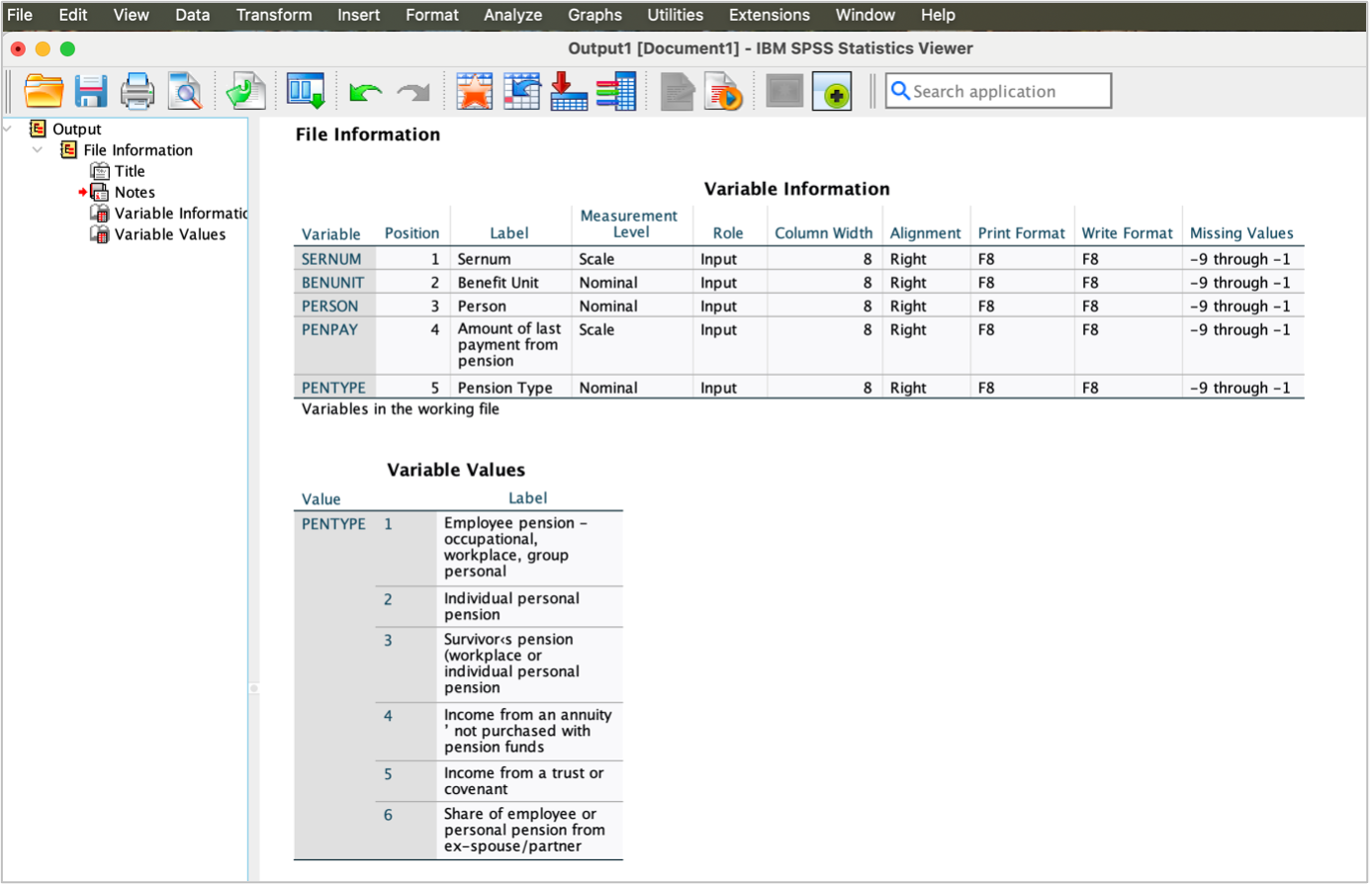
- What do PENPAY and PENTYPE measure and how?
- What is the value for ‘Amount of last pension payment’ of person 2 from benefit unit 1 with serial no. 16 in the frs_pension2223_short dataset?
- PENPAY records responses to the questions about ‘Amount of last payment from pension’. Responses are numeric. PENTYPE records responses to the questions about ‘Pension Type’. There are six possible responses to the question.
- The value for ‘Amount of last pension payment’ of person 2 from benefit unit 1 with serial no. 16 in the frs_pension2223_short dataset is 53.00745.
GET FILE='UKDA-9252-spss/spss/frs_pension2223_short.sav'.
  CODEBOOK PENPAY PENTYPE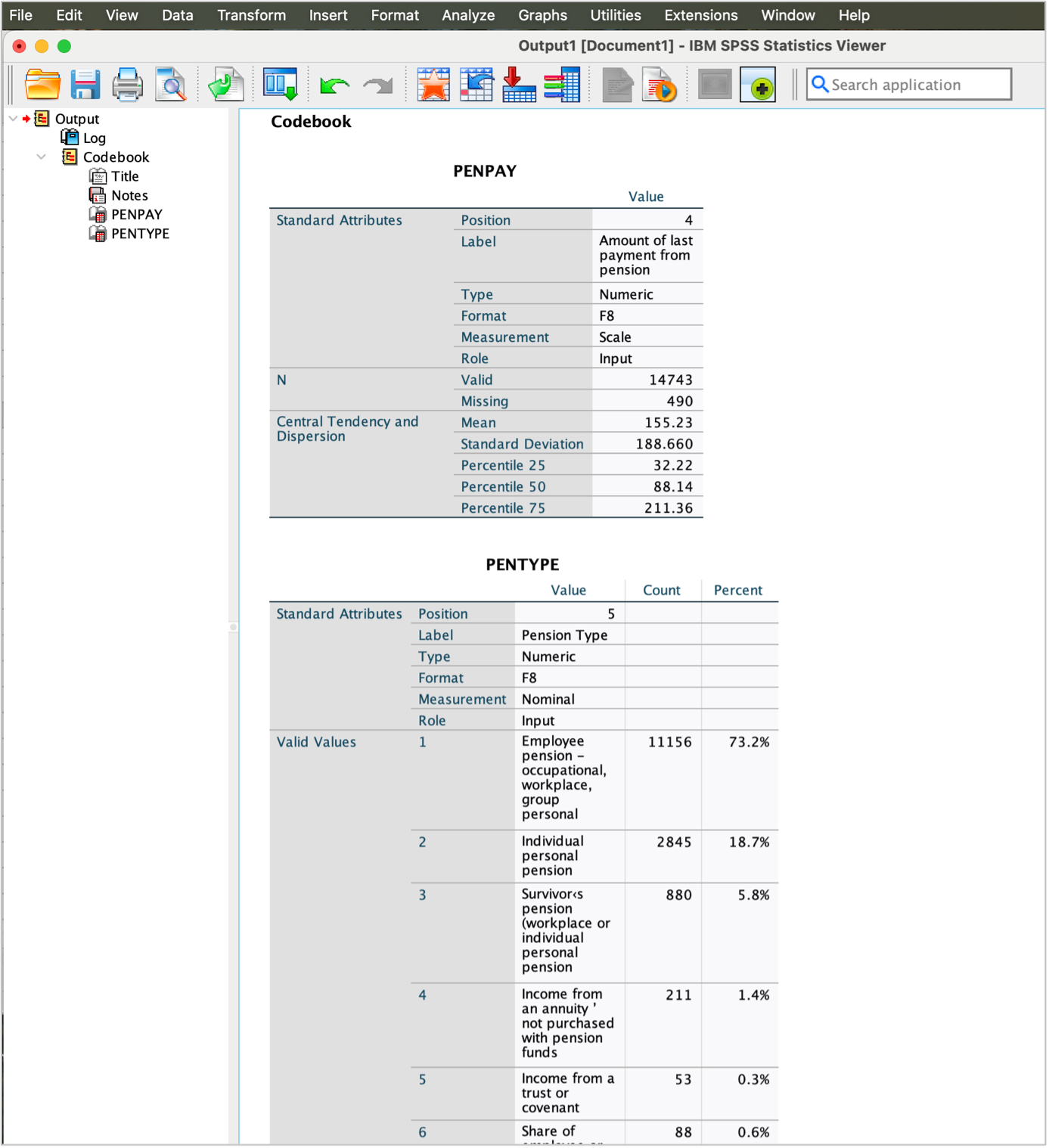
Descriptive analysis
Examining variables
Let’s now examine the frequency of the variables HEALTH1, SEX, and IAGEGR4 in the frs_adult2223_short dataset.
We can use the FREQUENCIES command to create a frequency table.
GET FILE='UKDA-9252-spss/spss/frs_adult2223_short.sav.
FREQUENCIES VARIABLES=HEALTH1 SEX IAGEGR4
  /ORDER=ANALYSIS.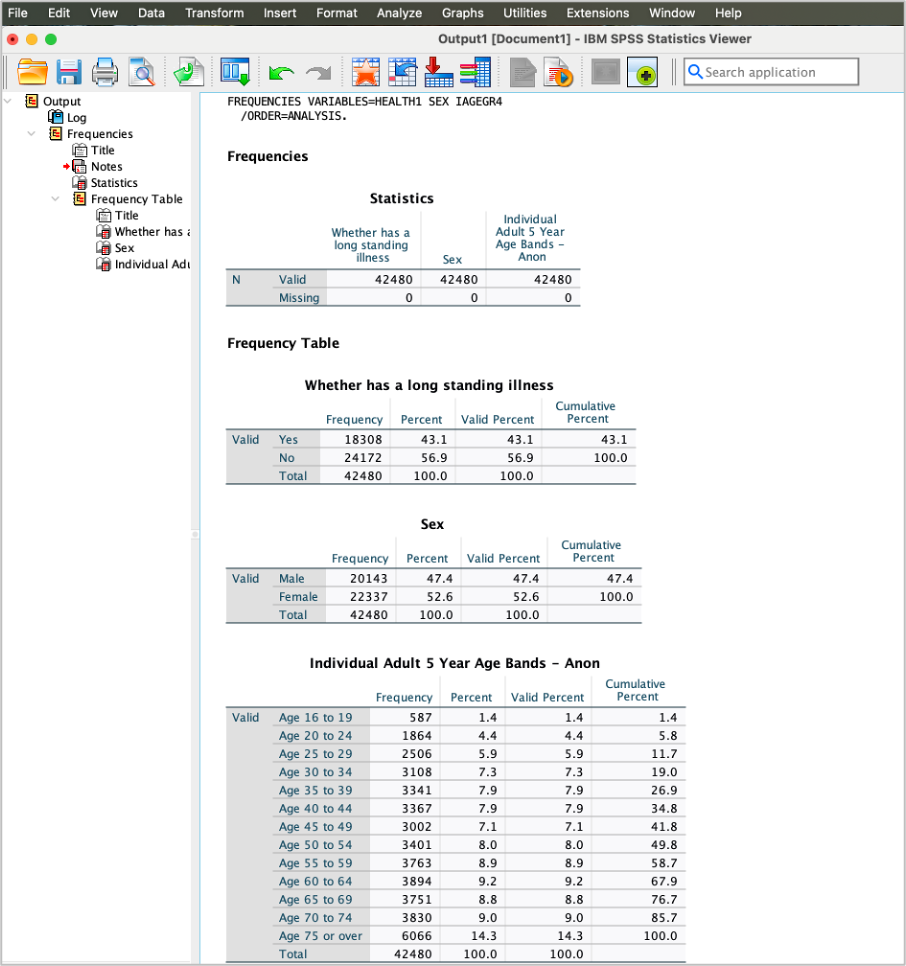
Let’s now examine the frequency of the variable famtypbu in the frs_ benunit2223_short dataset.
GET FILE='UKDA-9252-spss/spss/frs_benunit2223_short.sav'.
FREQUENCIES VARIABLES=famtypbu
  /ORDER=ANALYSIS.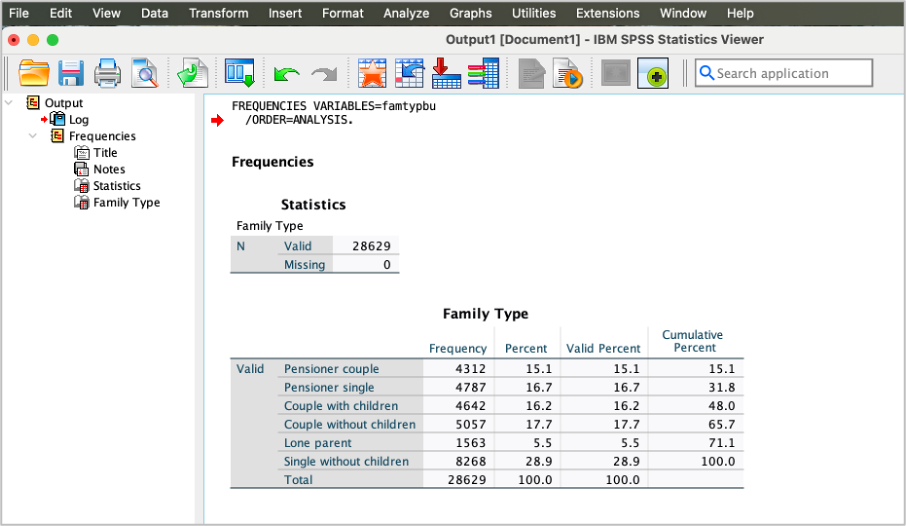
The amount of last payment from pension PENPAY is a continuous variable. So, we will use DESCRIPTIVES instead of FREQUENCIES command.
The DESCRIPTIVES command provides a summary of the main statistics including the rang, minimum and maximum values, the mean, and the standard deviation. This command is useful for assessing and detecting extreme values.
GET FILE='UKDA-9252-spss/spss/frs_pension2223_short.sav'.
DESCRIPTIVES VARIABLES=PENPAY
  /STATISTICS=MEAN STDDEV RANGE MIN MAX.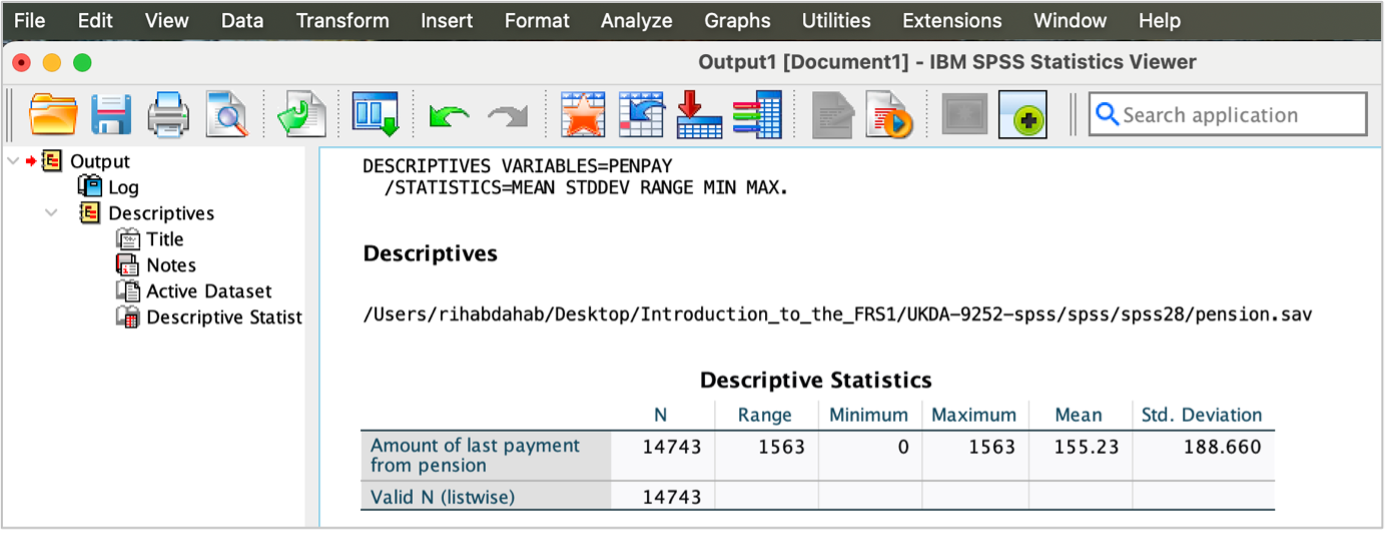
Your turn!
Use the frs_pension2223_short dataset to examine respondents’ pension type PENTYPE.
- Create a frequency table to measure pension type PENTYPE. Use
FREQUENCIEScommand.
Outcome!
- Frequency table of PENTYPE from the frs_ pension2223_short dataset:
GET FILE='UKDA-9252-spss/spss/frs_pension2223_short.sav'.
FREQUENCIES VARIABLES=PENTYPE
  /ORDER=ANALYSIS.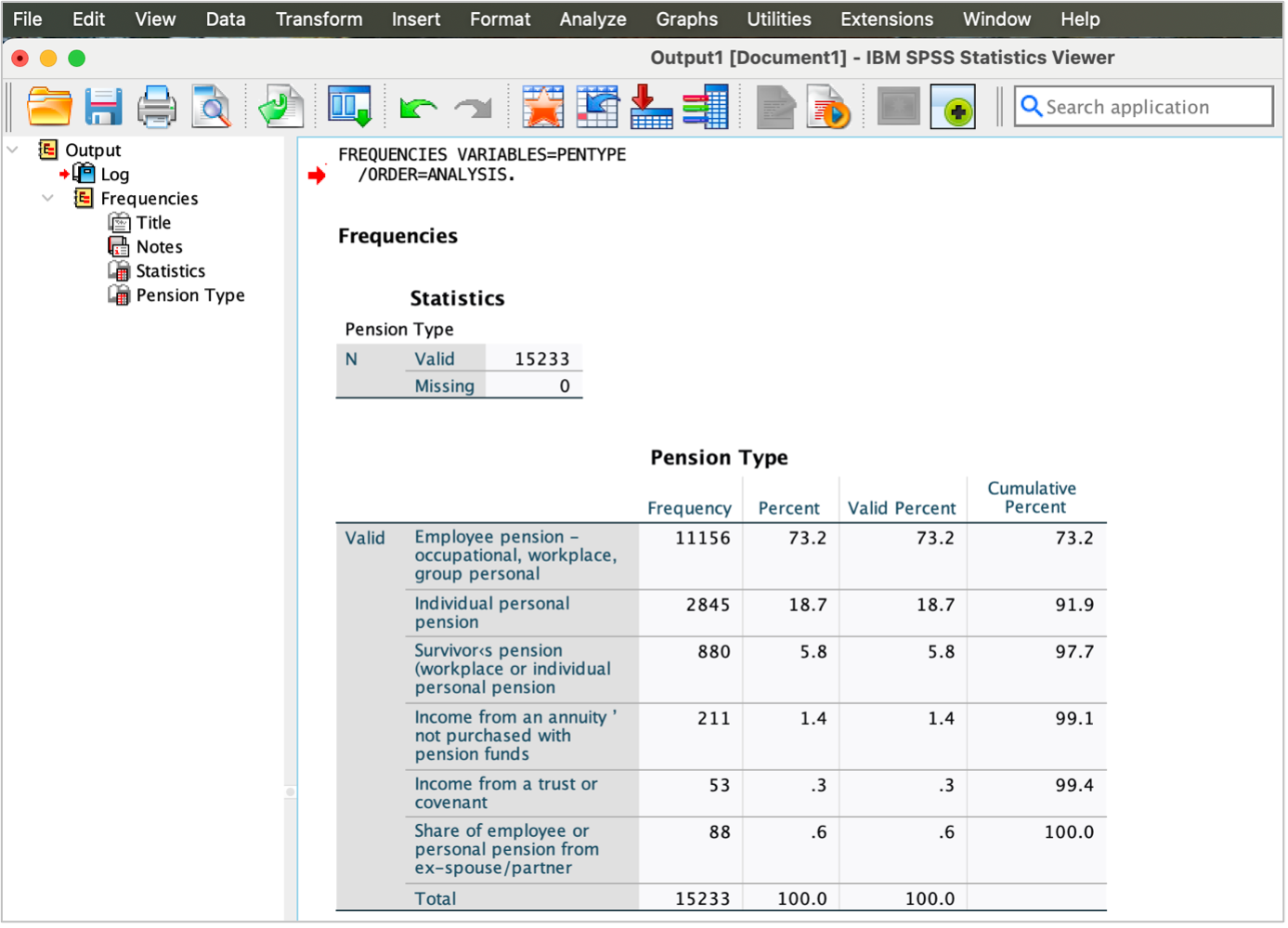
The Flat File
Explore the datasets
Let’s have a look at frs_frs2223_short dataset, the short version we have created from the flat file frs_frs2223.
Either inspect variables and cases in the Data View or use the code below to display a dictionary of all the variables in the dataset.
GET FILE='UKDA-9252-spss/spss/frs_frs2223_short.sav'.
DISPLAY DICTIONARY.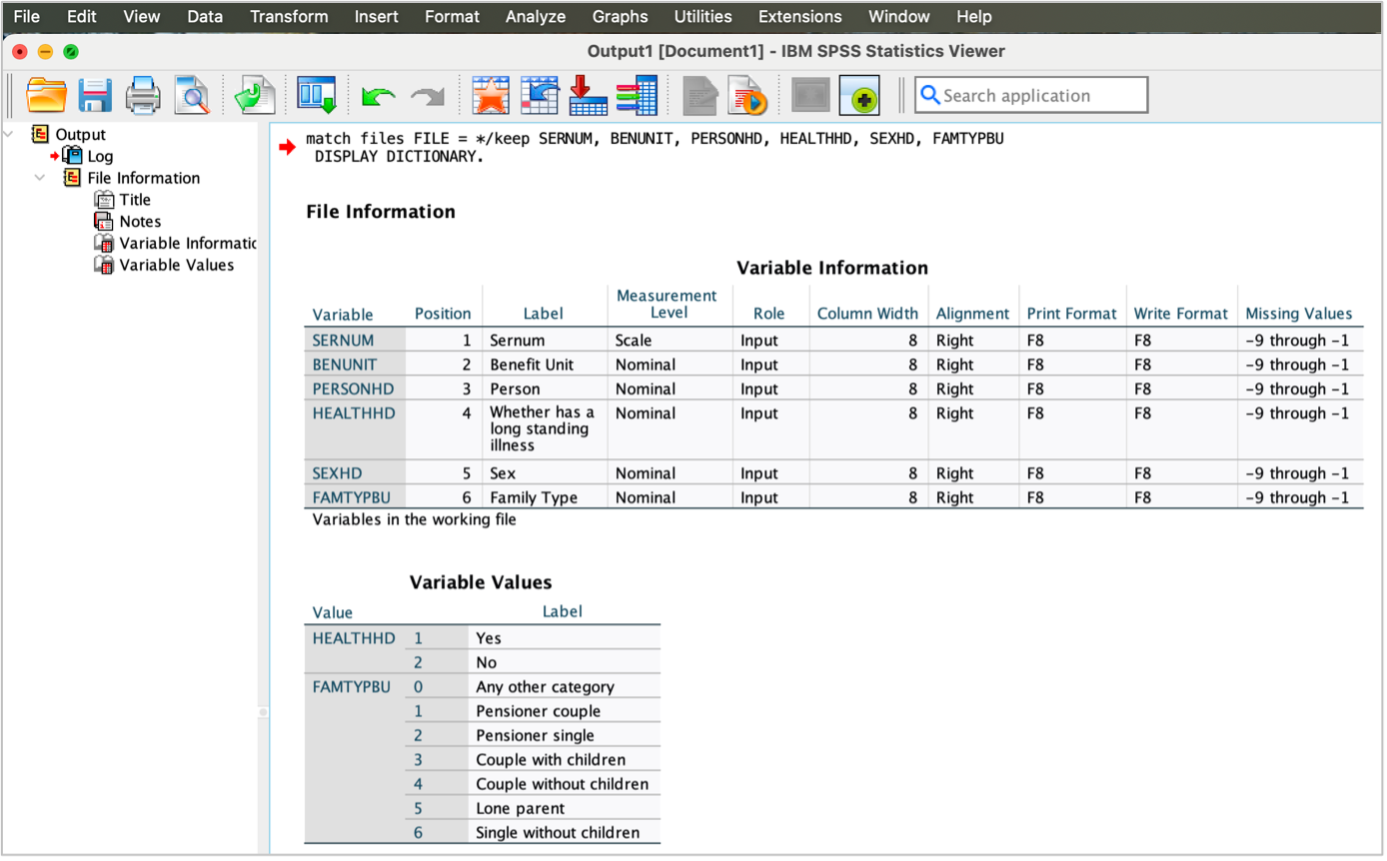
As you know by now, you can have a comprehensive information about the data using the codebook command. So, let’s explore frs_frs2223_short dataset and know more about the variables HEALTHHD and SEXHD.
GET FILE='UKDA-9252-spss/spss/frs_frs2223_short.sav'.
CODEBOOK HEALTHHD SEXHD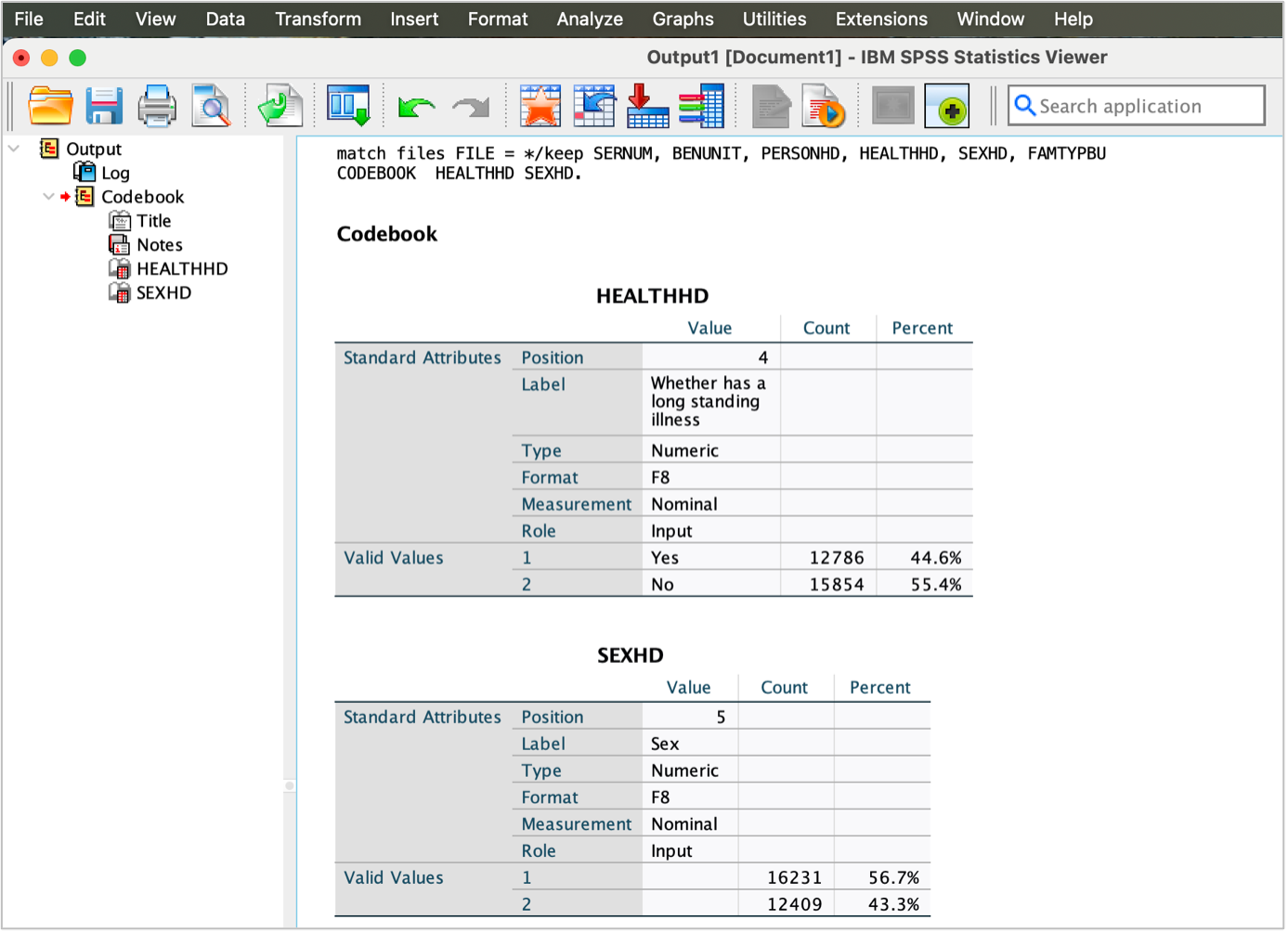
Compare the labels and value labels of the variables that measure long standing illness HEALTH1and Sex SEX (in the ‘frs_adult2223_short’ datasets) and Family type famtypbu (in the frs_benunit2223_short dataset) and those that measures the same variables in the frs_frs2223_short dataset (HEALTHHD, SEXHD and FAMTYPBU, respectively).
- Long standing illness in the ‘frs_adult2223_short’: both the lables and value labels are same as in the flat file. (b) Sex in the ‘frs_adult2223_short’: only the label is same as in the flat file. (c) Family type in the frs_benunit2223_short: both the variables labels and value labels are same as in the flat file.
However, the variables’ names in the flat file are slightly different than those in the hierarchical files to distinguish them.
Descriptive analysis
Examining variables
Let’s now examine the frequency of the variables HEALTHHD, SEXHD and FAMTYPBU in the frs_frs2223_short.
We will use the FREQUENCIES command to create frequency tables.
GET FILE='UKDA-9252-spss/spss/frs_frs2223_short.sav'.
FREQUENCIES VARIABLES=HEALTHHD SEXHD FAMTYPBU
  /ORDER=ANALYSIS.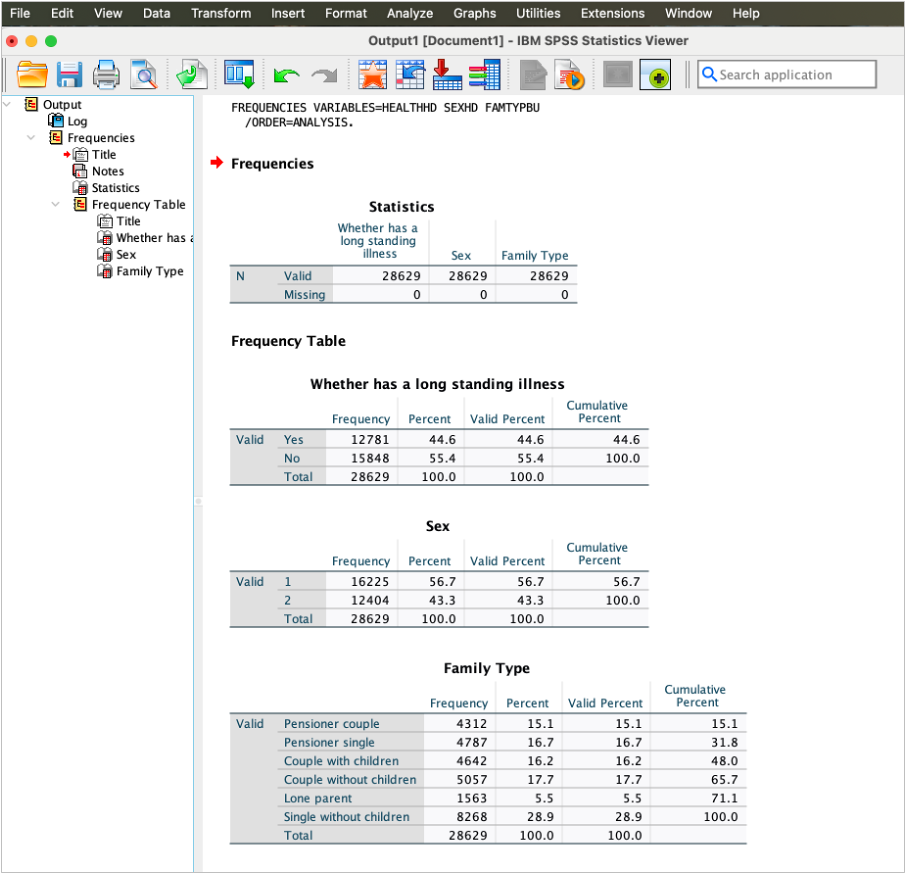
- How many observations are lone parent?
- How many observations are not long standing illness?
- What do you notice about the frequencies of FAMTYPBU in frs_frs2223_short dataset and the frequencies of the same variable famtypbu in frs_benunit2223_short dataset?
- There are 1563 lone parent.
- There are 15854 persons responded didn’t have long standing illness.
- The frequencies of the variables FAMTYPBU in frs_frs2223_short dataset and famtypbu in frs_benunit2223_short dataset are exactly the same as expected.